|
|
TITLE |
||
|
|
|||
|
DOCUMENT
ID |
6110
Appendix T2: Special
Lockout/Tagout Procedures |
||
|
|
|||

In
accordance with Jefferson Lab procedures (ES&H Manual Chapter 6110 Appendix
T1 Lockout/Tagout (LOTO) Procedure and ES&H Manual Chapter 6111 Administrative Control Using
Locks and Tags), a lock and/or tag is removed only by the original qualified Tagger who placed it on the
equipment, or an authorized person in the administrative control scenario. Only when the
original qualified Tagger is not physically on-site, or the information is
missing or illegible, is this special removal procedure to be utilized.
This appendix describes:
1.1
Produces
for removing an LOTO when the original person is unavailable.
1.2
Procedures for lockon and tagon in accordance with ES&H Manual Chapter 6111 Administrative Control Using
Locks and Tags.
1.3
Procedures
for LOTO in Confined Spaces can be referenced in this appendix in accordance with ES&H
Manual Chapter 6160 Confined Space Program.
1.4
Procedures
for an LOTO for testing purposes, simple and complex.
1.5
Procedures
LOTOs for non-electrical equipment is found in this appendix. To isolate energy
hazards, refer to equipment specific manuals for procedures and division
documentation.
These procedures are
used for removing a lock (maintenance or administrative) and/or a tag
(maintenance or administrative) when the owner is not physically on-site, or the information is missing or illegible. These
procedures also address situations in confined spaces, tagon/lockon, and
non-electrical equipment isolations.
Note: Management authority may be delegated to a task-qualified TJNAF
employee at the discretion of the responsible manager.
3.1
Employees at Jefferson Lab
3.1.1
Recognize and respect LOTO measures.
3.1.2
Do not remove any lock
or tag except those meeting the exceptions outlined within this appendix.
4.0
Process Steps for Special Removal of Tags/Locks When the Original Person
is Unavailable
Unless otherwise
stated, a qualified worker at Jefferson Lab may perform the process steps
listed below with Supervisor approval:
Step 1:
Attempt to Locate the Original Qualified Tagger
a.
Verify that the original
qualified Tagger, if known, is physically not on-site. Make a determined effort
to locate the individual by email, telephone, and pager.
|
NOTE: In the case that an email, telephone, or page from the original
qualified tagger is not returned in a timely manner, then there would need to
be consideration for an authorization for removal of a lock and/or tag. The “Special Lockout/Tagout (LOTO) Removal Form” must be
completed (see ES&H Manual
Chapter 6110 Appendix T5 Lockout/Tagout (LOTO) Forms) |
a.
Conduct a walk-through
inspection of the system and surrounding area to ensure no one is at risk from
restoration of energy.
b.
Inform all affected
individuals of the pending lock/tag removal.
Step 3:
Affirm Management Agreement
a.
Complete the “Special
Lock and Tag Removal” form in the ES&H
Manual Chapter 6110 Appendix T5 Special Lockout/Tagout (LOTO) Forms.
b.
Obtain approval
signature from:
1.
One of the following:
·
Your work group
supervisor
OR
·
Your department
manager
AND
2.
One of the following
(see NOTE below):
·
The original qualified
Tagger’s supervisor,
OR
·
The original qualified
Tagger’s department manager,
OR
·
The owner or primary
manager of the affected equipment.
|
NOTE: A verbal approval
signature (i.e. an email or telephone conversation)
is acceptable in critical situations when the approval signature person is
away from the laboratory. The conversation must be documented in the
corresponding approval signature block, stating when and with whom this
conversation took place, or by attachment of a copy of the e-mail. A verbal
signature from the original qualified tagger does NOT negate this special
lock and tag removal procedure. |
a.
Display a copy of the
completed form on, or closely adjacent to, the equipment
AND
b.
Display a copy of the
completed form on, or closely adjacent to, the area where the lock/tag was
removed (if different than above).
|
NOTE: The form(s) must remain in-place
until the original qualified Tagger removes it, or all reasonable efforts to
identify and/or locate the lock/tag owner have been exhausted; then the
equipment owner, with concurrence from the original qualified Tagger’s
supervisor (if known), may remove it. |
Step 4:
Remove the Lock and Tag
a.
Remove the device(s).
Exercise caution so as not to damage the components they are attached to. Do
not use any tool besides appropriately sized bolt cutters to cut a lock.
a.
Immediately
– Ensure the original
qualified Tagger’s supervisor is notified when removal is complete.
b.
Upon
return – The original qualified
Tagger’s supervisor notifies the original qualified Tagger of the change in
status.

5.0
Temporarily
Removing an LOTO for Testing
5.1
During work, if workers must
temporarily remove LOTO devices to test equipment (mode 2 work for electrical),
they must follow these steps:
Step 1:
Qualified Electrical Worker (QEW) (if the testing involves
electricity)
a.
Fills out the Special Lockout/Tagout (LOTO) Removal Form if a worker will be exposed to 50V or greater.
Step 2:
The Qualified Worker will clear the equipment, machine, or
system of tools and materials.
Step 3:
The Qualified Worker will have affected employees leave the
immediate area of the equipment, machine, or system.
Step 4:
All Qualified Workers who applied an LOTO will remove their
locks and tags.
Step 5:
The Qualified Worker will energize and proceed with
conducting their test.
Step 6:
Person in Charge (PIC), supervisor, or Qualified Worker when
testing is done will
a.
Decide what work needs to be done
b.
If it is a complex LOTO, then you
will need a different LOTO. Proceed to Step 9.
Step 7:
When Testing is complete, the Qualified Worker will:
a.
Implement all steps of the
appropriate LOTO procedure.
b.
Make sure all equipment is back in a
safe working condition
Step 8:
The Qualified Worker will continue the maintenance work and
end the procedure.
Step 9:
(Complex LOTO) The PIC, supervisor, or Qualified Worker
will:
a.
Decide if the currently install LOTO
on isolations devices can remain in place.
b.
Review, revise, and have approval
before performing the complex LOTO procedure. When the complex LOTO is revised,
proceed with the requirements of your department or your division’s procedure
for document control and submit for approval. If it is not approved, go to Step
10. If it is approved, go to Step 11.
Step 10:
The PIC, supervisor, or the Qualified Worker will:
a.
Determine which LOTO
isolation devices must remain in their current position.
b.
Install
administrative locks and tags on the applicable devices according to section 10.4, and direct that no
one may manipulate the isolation devices without prior authorization.
c.
Clear the complex
LOTO according to the current procedure.
d.
Revise the
procedure according to requirements of your department or your division’s
procedures for document control.
e.
Submit
the procedure for approval according to your division’s work planning and control process.
Step 11:
The person who will approve the complex LOTO will:
a.
Approve the revised procedure
OR
b.
Work with the PIC until the
procedure is ready for approval.
Step 12:
After the revision has been approved, the Qualified Worker
will:
a.
Perform the applicable authorized
work for a complex LOTO again
b.
Follow the revised procedure for LOTO.
Step 13:
The Qualified Worker will remove any administrative LOTOs
that were installed while waiting for the revised procedure.
6.0
Lockon
and Tagon
6.1 Lockon or tagon means applying an administrative lock and or tag (ES&H Manual Chapter 6111 Administrative Control Using Locks and Tags) to confirm service remains available.
6.2
The energy sources in Jefferson
Lab that may need lockon and/or tagon are primarily electrical circuits that directly affect
staff safety (critical loads) or protect property (essential loads).
The following list provides examples of each:
6.2.1
Critical loads: fire alarm and life safety systems, fire
pumps, exit or night lighting, certain telephone equipment, radiation
monitoring devices, and similar applications
6.2.2
Essential loads: sump pumps, certain
heating controls and devices, control power to most alarm circuits for the
central security system not characterized as critical, certain computer
circuits, certain experimental circuits, and other applications that might
cause injury or property loss if deenergized.
6.3
Jefferson Lab prefers lockon or tagon for essential and critical
circuits, but you may use tagon alone if it is not feasible to lock on the circuit control
device.
6.4
Obtain approval from division
management before locking and/or tagging on circuits. The division ESH
coordinator or safety coordinator must maintain a log that lists the following
and it MUST be approved by the AHJ:
· All circuits locked or tagged on
· Dates
· Reason for the lockon/tagon
6.5 Tags must indicate the follow:
· Reason the circuit is locked and/or tagged on
· Date the lock and/or tag was applied
· Who retains the key
6.6 Jefferson Lab recommends that the equipment owner or the person applying the administrative lock and tag conducts an annual audit of sources locked and tagged on.
7.0
LOTO
in Confined Spaces
For work located in a confined space that requires LOTO, ES&H Manual Chapter 6160 Confined Space
Program
, requires a minimum of two isolation methods
(per hazard type) to control fluid, gas, mechanical, and steam.
7.1
Before
disconnecting fluid, gas, or steam lines, isolate the lines by a minimum of two
methods upstream combined with a method to bleed and isolate the downstream. In
mechanical systems (for example, tank mixers), lock out the drive power source
and disconnect the linkage between the drive and the power transmission shaft.
7.2
If the system is in total shutdown (hazardous energy
sources were removed and all lines leading to the confined space were vented),
it does not need isolation. Likewise, the system does not require isolation if
all of the following are true: the liquid is not a hazard when not under
pressure, the source of pressure is locked out, and pressure in the lines is
reduced to a safe level. To determine if the liquid is a hazard under pressure,
see Table 10-1.

7.3 If toxic materials or toxic, flammable, or inert gas systems are present in a confined space, workers may need a Confined Space Entry Permit. Locking out and venting the systems before line breakage in the space may not be adequate to remove the hazard. Workers may need to flush the system to remove the hazardous chemicals before opening the system in the space. Failure to properly flush and vent may result in serious illness or death. For more information on working in confined space to flush or vent systems, refer to ES&H Manual Chapter 6160 Confined Space Program.
8.0
Using
Trapped-Key Interlock Systems
8.1
Trapped-key interlocks (also
known as a Kirk® key or sequestered key) use locking mechanisms and
keys to sequentially control equipment for safe operation. A safe sequence of
operations occurs by transferring trapped or released keys in a predetermined
order. Some interlocks include a time delay or a rotation detector so that a
machine has time to come to a stop before the next step of an interlock
sequence proceeds.
8.2
The following
list explains the requirements for trapped-key interlocks:
8.2.1
Multiple trapped-key interlock
systems need a complex LOTO procedure specific to the equipment, machine, or
system.
8.2.2
Workers must have equipment-specific
training and be qualified, or working under an authorized worker.
8.2.3
The PIC must control the last single
key, usually kept in a group LOTO box.
8.2.4
Perform Zero Energy Verification
(ZEV) and Zero Voltage Verification (ZVV) according to ES&H
Manual Chapter 6110 Appendix T4 Lockout/Tagout (LOTO) Zero Energy and Zero
Voltage Verification before authorized workers perform work on systems protected
by trapped-key interlocks.
9.0
Non-Electrical
Isolation
This
section provides examples of non-electrical isolations to illustrate potential
methods for use.
9.1
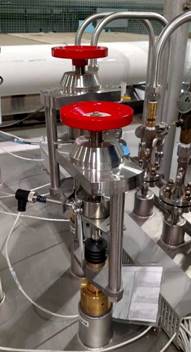
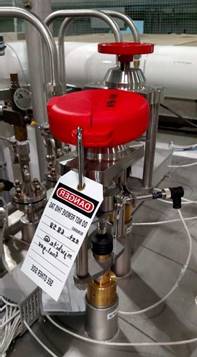
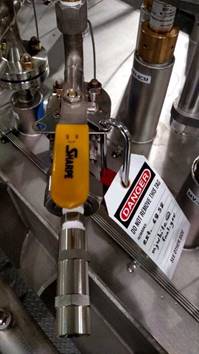
Isolate
and vert to prevent pressure build-up from a potentially leaking value
(pressure transducer used to verify pressure before applying an LOTO – not
shown in the pictures).
|
Isolate LOTO Bleed |
||
|
|
|
|
|
|
|
|
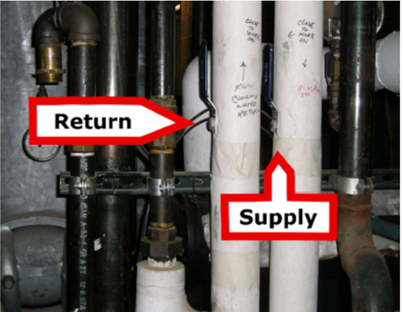
9.2 Pneumatically
actuated valve (air-to-open, spring-to-close) LOTO-closed
Step 1:
Verify pressure indicator against other pressure indicators
on instrument air system.
Step 2:
Close, lock,
and tag instrument air supply valve.
Step 3:
Vent
instrument air (remove fitting as required).
Step 4:
Verify
control pressure removed and valve closed with local indication.
|
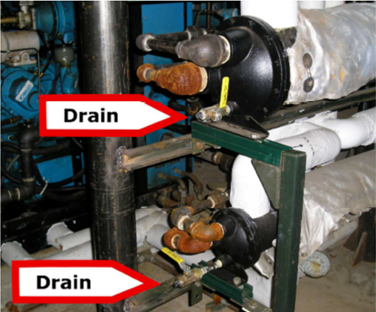
Inlet and outlet isolation with drain |
|
|
|
|
|
|
|
10.0
Revision
Summary
TPOC change - 01/28/2023 per CBailey (Industrial Safety Program Lead)
change TPOC from TFitzgerald to PStanley; ES&H Manual Editor fixed format
only; no content review at this time
Revision 2.1- 02/16/22 Updated information, header, and links.
No new approval needed
Revision 2.0- 01/13/21 Updated information, format, and links, Updated header and footer. Approved by the Director and ES&H
Director.
Revision 1.5 – 10/23/19 Updated TPOC from T.Kujawa to T.Fitzgerald
Periodic Review – 03/09/18 No changes per TPOC
Revision 1.4 – 03/09/15 Periodic Review; No
substantive changes
Revision 1.3 – 02/15/13 Clarified verbiage; No substantive changes
Revision 1.2 – 05/10/12 Clarified verbiage; No substantive changes
Revision 1.1 – 12/01/11 Clarification of process steps and
updates made to format. Qualifying periodic review, no substantive changes
required.
Revision 1.0 –
04/04/09
Update to reflect current
laboratory operations.




|
|
ISSUING
AUTHORITY |
TECHNICAL
POINT-OF-CONTACT |
APPROVAL
DATE |
NEXT REVIEW
DATE |
REVIEW
CYCLE |
rev |
|
|
|
ES&H Division |
01.13.2021 |
01.28.2026 |
3 years |
2.1 |
|